
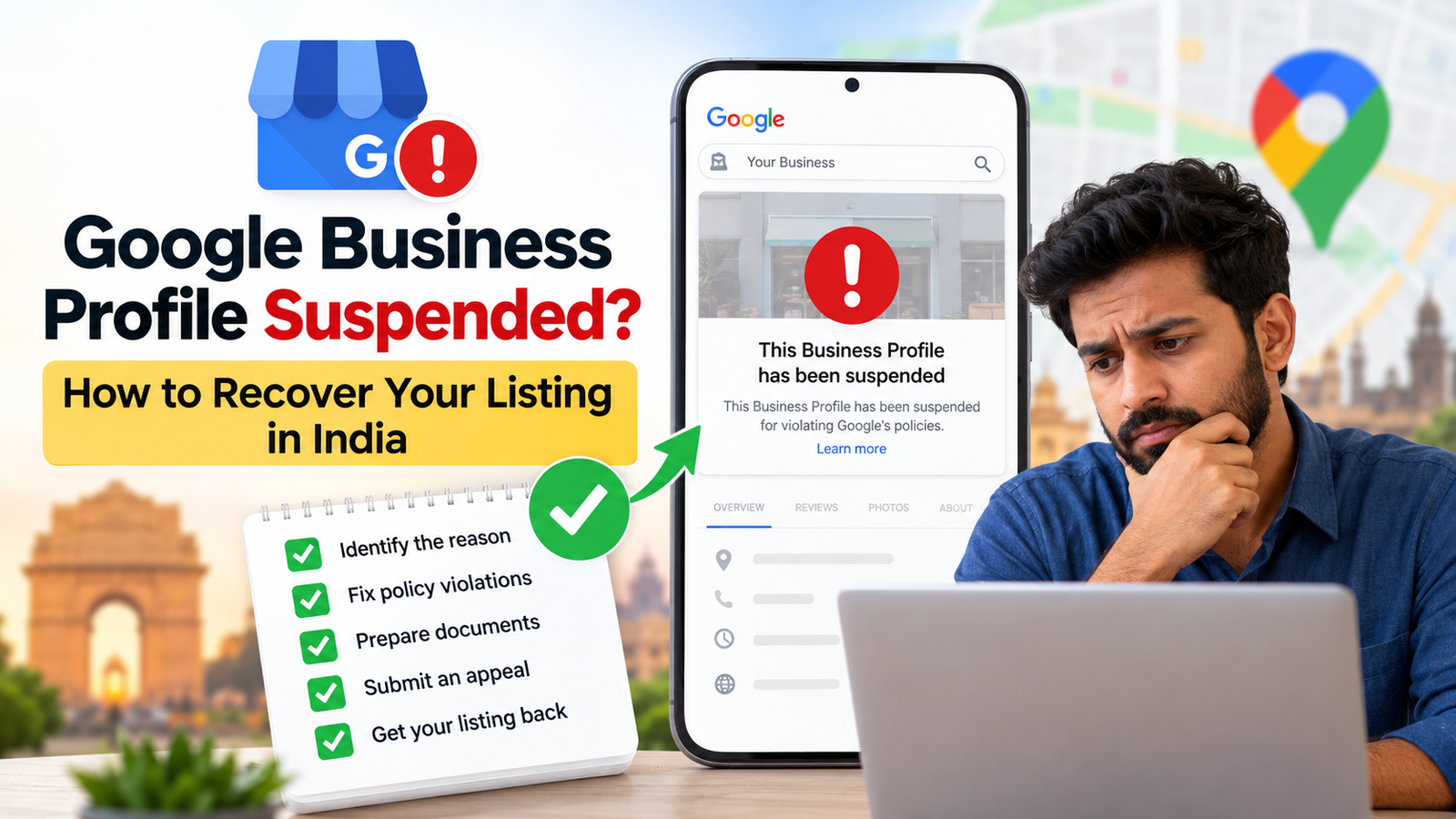
Is your Google Business Profile suspended, and is your business no longer appearing on Google Maps? This can be frustrating, especially when customers depend on Google to find your location, phone number and opening hours. A suspended listing can affect your online visibility and make it difficult for potential customers to contact you.
Fortunately, Google Business Profile suspension recovery in India is possible for eligible businesses. You need to understand why your listing was suspended, correct any policy violations, prepare supporting documents and submit an appeal through Google’s official process.
In this guide, you’ll learn how to recover a suspended Google Business Profile, understand common suspension reasons, prepare the necessary documents and handle a rejected appeal.
Quick Answer: How to Recover a Suspended Google Business Profile
To recover your suspended Google Business Profile in India, review Google’s suspension decision, correct any inaccurate business information, prepare documents such as business registration or utility bills, and submit an appeal through the official Google Business Profile appeals tool. If your appeal is rejected, you may be eligible to request an additional review.
What Does Google Business Profile Suspension Mean?
Google Business Profile suspension happens when Google restricts a business listing that may not follow its guidelines. Depending on the action taken, your business may lose visibility on Google Search and Maps or face restrictions when managing its profile.
According to Google’s official suspension guidelines, businesses that violate its policies may have their listings suspended or disabled. However, eligible businesses can request reinstatement through Google’s appeals process.
A Google Maps listing plays an important role in helping local customers find businesses. To understand how it compares with other business directories, read our guide on JustDial vs Google Business Profile.
Difference Between a Suspended and Disabled Google Business Profile
Google uses both suspension and disabling actions, but the exact restrictions depend on the enforcement decision.
| Suspended Business Profile | Disabled Business Profile |
| Google restricts the business listing | Google disables the profile |
| Search visibility or profile management may be affected | The profile may become unavailable to customers |
| Eligible businesses can submit appeals | Eligible businesses can request reinstatement |
| Restoration depends on Google’s review | Restoration depends on Google’s review |
If your listing is suspended or disabled, review the enforcement details in your account before submitting an appeal.
Why Is Your Google Business Profile Suspended?
If you find your Google My Business suspended, there may be a problem with your business information, account or eligibility.
Google expects businesses to provide accurate details about their names, addresses, operating locations and services. Information that does not meet these requirements can lead to restrictions.
Common Google Business Profile Suspension Reasons
According to Google’s guidelines for representing your business, businesses must accurately represent their real-world operations.
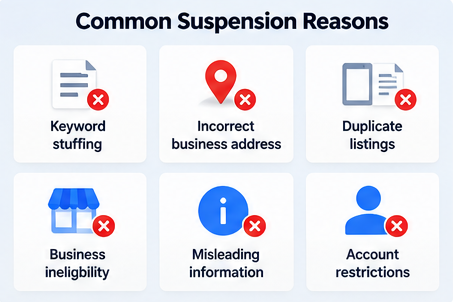
Common Google Business Profile suspension reasons include:
- Keyword stuffing: Adding unnecessary keywords or city names to your business name.
- Incorrect business address: Using a fake location, mailbox or ineligible virtual office.
- Duplicate listings: Creating multiple profiles for the same business without a valid reason.
- Business eligibility problems: Listing a business that does not qualify for Google Business Profile.
- Misleading information: Providing inaccurate business details or categories.
- Account restrictions: Policy violations affecting the Google Account managing your listing.
For example, a clinic officially named “Sharma Dental Clinic” should not change its Google listing name to “Best Dentist in Delhi – Affordable Dental Clinic” simply to improve rankings.
Google requires the business name to reflect how the business is genuinely represented to customers.
Google Business Profile Suspended After Verification or Address Change
Sometimes, business owners discover that their Google Business Profile was suspended after verification or an address change.
Changing important business information may trigger additional verification. Incorrect addresses or locations that do not meet Google’s eligibility requirements can also cause problems.
If your business recently moved, check these details:
- Confirm your new business address is correct.
- Make sure your business actually operates from the location.
- Update relevant contact information on your website.
- Prepare documents proving your new business location.
- Complete any additional verification requested by Google.
Service-area businesses must follow specific address rules. For example, plumbers and home cleaning businesses that visit customers but do not receive them at their business address should generally hide that address.
Learn more through Google’s official service-area business guidelines.
How to Recover a Suspended Google Business Profile in India
If your Google business listing is suspended, follow the official reinstatement process instead of creating another listing.
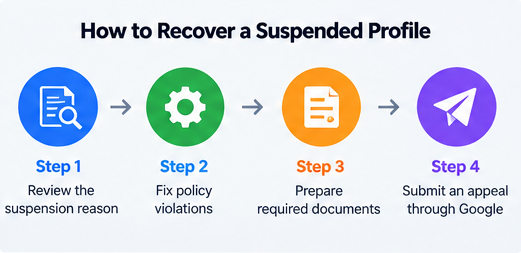
The Google My Business suspension recovery process generally involves reviewing Google’s decision, correcting inaccurate information, preparing evidence and submitting an eligible appeal.
Step 1: Identify and Fix Google Business Profile Policy Violations
Start by signing in to the Google Account associated with your suspended listing.
Review the available enforcement information and compare your profile with Google’s Business Profile guidelines.
Check the following:
- Does your business name match your real-world branding?
- Is your address correct and eligible?
- Have you selected appropriate business categories?
- Are there duplicate listings for the same business?
- Does your business qualify for Google Business Profile?
- Is the Google Account managing your profile restricted?
Correct inaccurate information where appropriate and ensure the listing complies with Google’s guidelines.
Important: Google specifically advises business owners not to create a new Business Profile for the same business while requesting reinstatement.
Step 2: Prepare Documents for Google Business Profile Reinstatement
Before submitting your Google Business Profile reinstatement request, gather documents that support your business identity and location.
Google accepts different types of supporting evidence, including business registration, licences, tax certificates and utility bills.
Make sure the business name and address on your documents match the information associated with the listing you want reinstated.
The complete India-specific document checklist is provided in the next section.
Step 3: Submit a Google Business Profile Suspension Appeal
Once your information and documents are ready, you can begin the Google Business Profile suspension appeal process.
Follow these steps:
- Open the official Google Business Profile appeals tool.
- Sign in using the Google Account connected to your business listing.
- Select the affected Business Profile and click Continue.
- Choose the decision you want to appeal and review the policy details.
- Upload supporting evidence if applicable.
- Explain why your business meets Google’s eligibility requirements.
- Confirm that your supporting evidence is attached and select Submit appeal.
Google allows multiple supporting files to be attached to an appeal. You can also use the explanation box to provide relevant details about your business.
Important: Google’s current instructions state that an appeal can only be submitted once through this process. Make sure your information is accurate before submitting it.
Official source: Google – Fix Suspended or Disabled Profiles
Step 4: Check Your Google Business Profile Appeal Status
After submitting your appeal, return to the Google Business Profile appeals tool to check the decision.
Google displays different appeal statuses depending on the case.
| Appeal Status | Meaning |
| Submitted | Google has received your appeal |
| Approved | Your appeal was accepted |
| Not Approved | Your appeal was rejected |
| Eligible for Appeal | You can appeal the decision |
| Can’t Be Appealed | The decision is not eligible for appeal |
Google also sends an email with its appeal decision.
Avoid submitting repeated requests while your appeal is under review. If the appeal is rejected, check whether the additional review process is available.
Documents Required for Google Business Profile Reinstatement in India
For Google Business Profile reinstatement in India, supporting documents help Google assess whether your business is genuine and eligible.
There is no single document checklist that guarantees approval. The evidence needed depends on your business type, available records and the reason for suspension.
Business Registration, GST Certificate and Utility Bills
The following documents may support your Google Business Profile suspension appeal.
| Document | Purpose |
| Business registration certificate | Helps verify the legal identity of the business |
| GST registration certificate | May support business registration and address details |
| Trade or business licence | Helps demonstrate legitimate business operations |
| Electricity or water bill | May help confirm the business location |
| Business telephone or internet bill | May support business contact and address details |
For example, a registered business in Mumbai may provide its business registration certificate and a utility bill displaying matching business information.
A GST certificate can be useful evidence, but it is not compulsory for every business seeking reinstatement.
Important: Google advises that supporting documents should display business details that match the profile being appealed. For an additional review, Google may also request the Business Profile ID and further documents.
You can check Google’s official evidence requirements before uploading your documents.
What to Do If Your Google Business Profile Appeal Is Rejected?
If your Google Business Profile appeal is rejected, it does not necessarily mean that every option is closed.
Review the original decision and identify any missing or incorrect business information. You should also check whether your supporting evidence clearly demonstrates that your business meets Google’s eligibility requirements.
Do not create duplicate listings or submit misleading information to bypass the suspension.
How to Request an Additional Review for Reinstatement
Google provides an additional review process for certain denied reinstatement appeals.
Follow these steps:
- Review the decision on your original appeal.
- Check whether your business details follow Google’s policies.
- Collect additional supporting evidence that was not included previously.
- Open Google’s additional review request form.
- Provide the required business details, Business Profile ID and supporting documents.
- Explain why your business should be reinstated and submit the request.
Google’s additional review process is intended for businesses whose initial reinstatement appeals were denied.
Submitting additional evidence does not guarantee reinstatement. Google makes the final decision based on its guidelines and review process.
Tips to Keep Your Business Listing Active
Once your business listing is restored, regularly reviewing its information can help reduce the risk of further suspension issues.
Follow these best practices:
- Use your actual business name without unnecessary keywords.
- Keep your address and service area accurate.
- Select categories relevant to your business.
- Avoid creating duplicate Google Maps listings.
- Maintain consistent contact details across your website and business profile.
- Update your opening hours when needed.
- Review Google’s guidelines before making major business changes.
- Keep relevant business documents available for future verification.
Maintaining accurate business information also supports your broader local search presence.
If you want to strengthen your local visibility, explore Namo Marketing’s local SEO services in India, which focus on helping businesses improve their presence in location-based searches.
You can also use our free SEO audit checklist for Indian websites to review website health, search visibility and optimization opportunities.
For businesses planning a wider organic search strategy, our SEO services in India cover additional website optimization needs.
However, remember that website optimization alone cannot resolve Google Business Profile policy violations. Reinstatement always depends on Google’s eligibility requirements and appeal decision.
Frequently Asked Questions
Why Was My Google Business Profile Suspended for No Reason?
If Google suspends your listing without a clear explanation, check the enforcement details in the official appeals tool.
Possible issues include inaccurate business information, duplicate listings, business eligibility problems or account restrictions.
Review Google’s policies before assuming the suspension occurred without a valid reason.
How Long Does Google Business Profile Reinstatement Take in India?
There is no guaranteed reinstatement time for every suspended Google Business Profile.
The time required depends on the case, Google’s review process and whether additional evidence or review is needed.
Check your appeal status and email regularly for updates from Google.
Can I Recover a Suspended Google Business Profile Without a GST Certificate?
Yes. A GST certificate is not a universal requirement for every Google Business Profile reinstatement appeal.
Google accepts other forms of supporting evidence, including official business registration, licences and utility bills.
Submit documents relevant to your business that accurately support its identity and location.
What If My Google Business Profile Is Not Eligible for Appeal?
If the appeals tool shows that your listing cannot be appealed, confirm that you are signed in with the correct Google Account and review the displayed restriction.
If your managing Google Account is restricted, you may need to resolve that restriction before appealing the Business Profile suspension.
Follow Google’s official account restriction guidance for the appropriate steps.
Will My Google Reviews Return After Reinstatement?
A successful reinstatement does not guarantee that all previous reviews will become visible immediately.
If reviews are missing after your listing is restored, check the profile and contact Google Business Profile Help if the issue remains unresolved.
Final Thoughts
A suspended Google Business Profile can affect how customers discover and contact your business, but eligible businesses can request reinstatement through Google’s official appeals process.
Start by identifying the issue, correcting inaccurate information and gathering relevant evidence. Submit your appeal carefully and check its status for Google’s decision.
If your request is rejected, review your documentation and explore the additional review option where available.
At Namo Marketing, we help Indian businesses improve their Google Search and Maps visibility through practical local SEO strategies.
Need help improving your local search visibility? Explore our local SEO services in India to learn how your business can strengthen its online presence.
Remember: Only Google can approve Business Profile reinstatement. No agency can guarantee recovery of a suspended listing.