
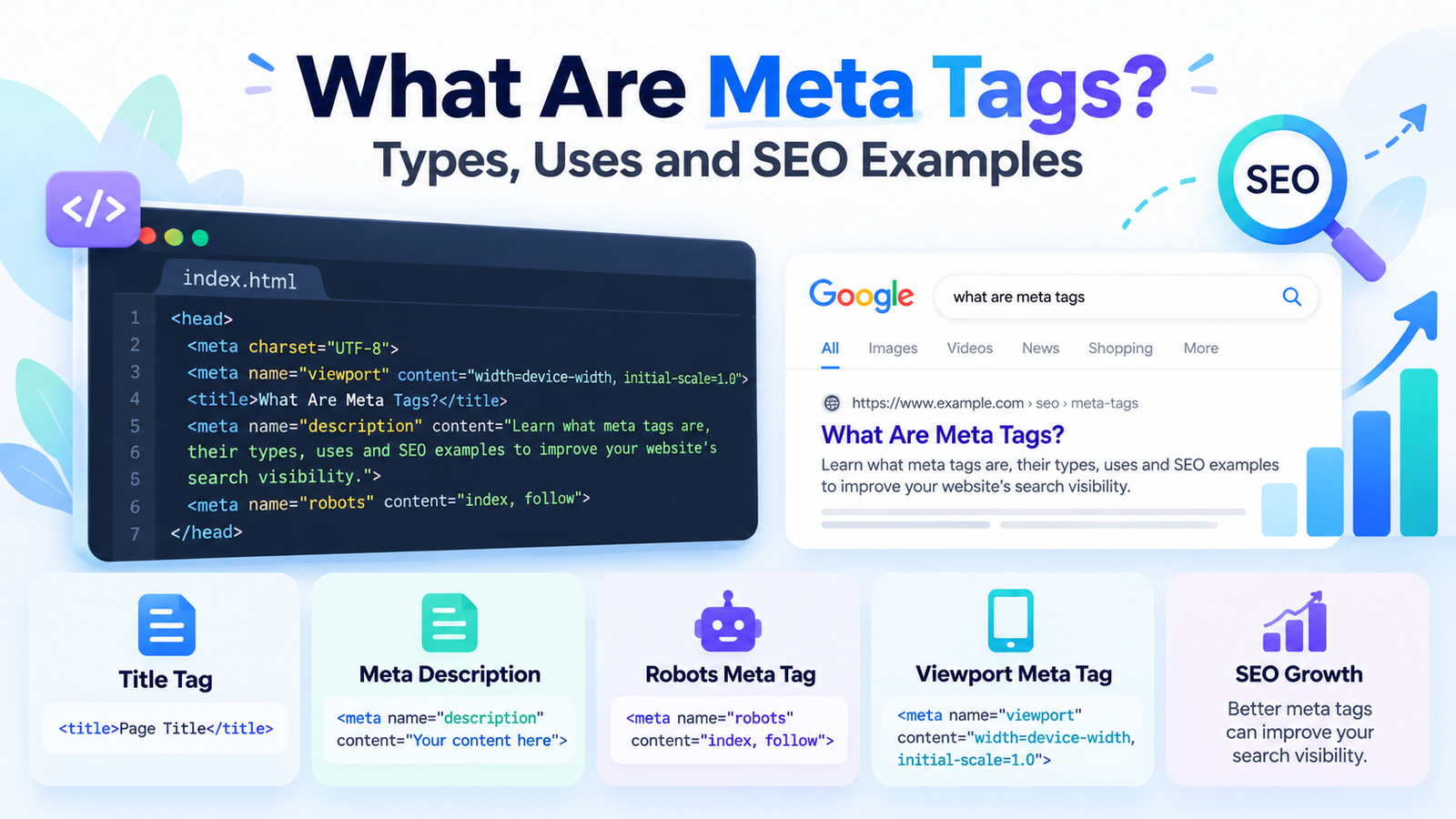
Meta tags are an important part of search engine optimization (SEO). They help search engines understand webpage information and influence how websites appear in search results. Whether you manage a business website, blog, or online store, understanding meta tags can help you improve your website’s search appearance and technical SEO.
However, not every meta tag directly influences Google rankings. Some describe webpage content, while others control indexing, browser behavior, or mobile display. In this guide, you’ll learn what meta tags are, their types, uses, HTML examples, and best practices for optimizing your website.
What Are Meta Tags in SEO?
Meta tags are HTML elements that provide information about a webpage to search engines, browsers, and other online platforms. This information is called metadata and is usually placed inside the <head> section of a webpage’s HTML code.
In simple language, meta tags communicate important details about a page without displaying those details in its main content.
Simple Meta Tags Example
<head>
<title>SEO Tips for Beginners</title>
<meta name=”description”
content=”Learn simple SEO tips to improve your website visibility.”>
</head>
In this example:
- Title tag: Defines the webpage title.
- Meta description: Summarizes the webpage content.
- Head section: Contains metadata and other page information.
Technically, the HTML title element is not a meta tag, but it is often discussed alongside SEO meta tags because it helps describe webpage content.
According to MDN’s HTML meta element documentation, the <meta> element represents metadata that cannot be expressed using other metadata-related HTML elements.
Why Are Meta Tags Important for SEO?
The importance of meta tags in SEO comes from their ability to communicate webpage information and provide instructions to search engines. Proper metadata helps search engines process your content and can improve how your website appears to potential visitors.
However, metadata works best alongside helpful content, relevant keywords, internal links, and proper technical optimization.
Main Benefits of Meta Tags
- Search appearance: Descriptive titles and summaries help users understand your content.
- Click-through opportunities: Relevant snippets can encourage visitors to explore your website.
- Indexing control: Robots directives manage how supporting search engines index webpages.
- Mobile compatibility: Viewport settings help browsers display webpages correctly on mobile devices.
- Content identification: Metadata provides additional information about a webpage.
- Social sharing: Social metadata can improve how links appear on supported platforms.
Businesses looking to improve their overall organic visibility can explore professional SEO services, which combine metadata optimization with keyword research, technical improvements, content optimization, and internal linking.
How Do Meta Tags Work?
Meta tags work by providing information that search engine crawlers and browsers can process when accessing a webpage. When Google discovers a page, it may examine supported metadata alongside visible content to understand the page and determine how it should appear in search results.
However, search engines do not use every meta tag, and adding metadata does not guarantee better rankings.
How the Process Works
- A website owner adds relevant metadata to the HTML head section.
- Search engine crawlers discover and access the webpage.
- Supported metadata and webpage content are processed.
- The search engine determines indexing and search presentation.
- Users may see a relevant title and description in search results.
Google explains that its search process involves crawling, indexing, and serving results. You can understand these stages through its official guide to how Google Search works.
Types of Meta Tags in SEO
There are several types of meta tags in SEO, each serving a different purpose. Some describe webpage content, while others manage indexing instructions, character encoding, and browser display settings.
Understanding the differences helps website owners use the correct metadata for their optimization needs.
| Meta Tag or Element | Main Purpose | SEO Relevance |
| Title tag | Defines the webpage title | Supports search relevance |
| Meta description | Summarizes page content | Supports search snippets |
| Meta robots | Controls crawler instructions | Controls indexing eligibility |
| Meta viewport | Controls mobile viewport | Supports mobile display |
| Meta charset | Defines character encoding | Supports readable content |
| Meta keywords | Lists webpage keywords | Ignored by Google Search |
| Open Graph tags | Controls social sharing previews | Supports social presentation |
Let’s explore the most important HTML meta tags with practical examples.
1. Meta Title Tag in SEO
The meta title, commonly called the SEO title, is an important HTML element used to describe webpage content. It may appear as the clickable headline in search results, helping users understand the main topic before visiting a website.
An effective title should clearly describe the content while naturally including a relevant primary keyword.
Meta Title Tag Example
<title>Meta Tags in SEO: Complete Guide</title>
SEO Title Best Practices
- Include the primary keyword naturally.
- Keep the title clear and descriptive.
- Write a unique title for important pages.
- Avoid unnecessary keyword repetition.
- Place important information near the beginning.
- Use approximately 50–60 characters as a practical writing guideline.
Google does not enforce a fixed title character limit and may generate a different title link when appropriate.
For detailed guidance, read Google’s title link best practices.
2. What Is a Meta Description Tag?
A meta description tag is an HTML element that provides a short summary of a webpage. Search engines may use this description to generate the text displayed beneath a result’s title.
A well-written meta description helps potential visitors understand what the webpage offers and whether it matches their search intent.
Meta Description Tag Example
<meta name=”description”
content=”Learn what meta tags are, their types, uses, and SEO examples to optimize your website.”>
How to Write a Good Meta Description for SEO
- Explain the main topic clearly.
- Include the primary keyword naturally.
- Create unique descriptions for important pages.
- Highlight relevant benefits or information.
- Avoid repeating unnecessary keywords.
- Use approximately 150–160 characters as a writing guideline.
Google does not specify a fixed meta description length. Search snippets are shortened when necessary to fit the available display space.
According to Google’s search snippet documentation, snippets are primarily generated from webpage content, although Google may use the meta description when it provides a more useful summary.
3. Meta Robots Tag Explained
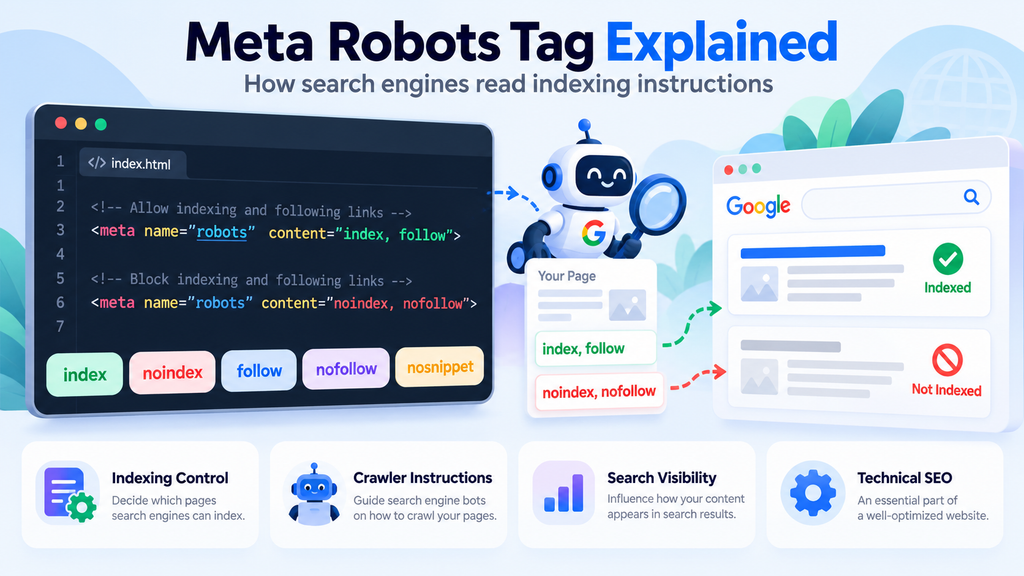
The meta robots tag gives instructions to search engine crawlers about indexing and certain aspects of search result presentation.
This tag is particularly useful when website owners want to prevent selected pages from appearing in search results or control the information displayed alongside indexed pages.
Meta Robots Tag Example
<meta name=”robots” content=”index, follow”>
Common robots directives include:
- index: Permits indexing.
- noindex: Requests that the page not be indexed.
- follow: Allows link following.
- nofollow: Requests that links on the page not be followed.
- nosnippet: Prevents the display of a text snippet in supported search results.
For example:
<meta name=”robots” content=”noindex”>
This instructs supporting search engines not to index the page.
Important: Never accidentally add noindex to important pages. Search engines must also be allowed to crawl the page to discover its robots instructions.
Google provides detailed technical information in its robots meta tag documentation.
4. Meta Viewport Tag
The meta viewport tag helps browsers display webpages correctly across different screen sizes. It is commonly used in responsive website design to ensure that layouts adapt to mobile phones, tablets, and desktop devices.
Without a suitable viewport configuration, webpages may appear unusually small or require horizontal scrolling.
Meta Viewport Example
<meta name=”viewport”
content=”width=device-width, initial-scale=1″>
This tells the browser to use the device width when setting the viewport.
Businesses developing responsive websites should combine viewport settings with flexible layouts, readable text, and mobile-friendly navigation. Professional website design services can help businesses create responsive, SEO-friendly websites that work across different devices.
5. Meta Charset Tag
The meta charset tag defines the character encoding used by a webpage. It helps browsers display letters, symbols, punctuation, and multilingual text correctly.
UTF-8 is widely used because it supports many languages and special characters.
Meta Charset Example
<meta charset=”UTF-8″>
Although character encoding is not a direct Google ranking factor, incorrect settings may cause display problems and reduce content readability.
6. Meta Keywords Tag
The meta keywords tag was historically used to list search terms related to a webpage. Website owners often inserted numerous keywords into this tag, expecting them to improve search engine rankings.
However, Google Search does not use the meta keywords tag for indexing or ranking.
Meta Keywords Example
<meta name=”keywords”
content=”SEO, meta tags, HTML”>
Instead of relying on this outdated practice, focus on creating useful content with naturally placed keywords.
Google confirms in its supported meta tags documentation that the meta keywords tag has no effect on Google Search indexing or ranking.
7. Open Graph Meta Tags
Open Graph metadata controls how webpage information appears when links are shared on supported social media platforms.
These tags can define the title, description, image, and webpage URL used in social sharing previews.
Open Graph Example
<meta property=”og:title”
content=”Complete Meta Tags Guide”>
<meta property=”og:description”
content=”Learn SEO meta tags with examples.”>
<meta property=”og:type”
content=”article”>
Open Graph tags are not direct Google ranking factors, but clear social previews can make shared content easier to understand.
How to Add Meta Tags to a Website
Adding meta tags to a website depends on the platform or content management system being used. Most modern website platforms allow users to update SEO titles and descriptions without manually editing every HTML file.
Adding Meta Tags in HTML
- Open the website’s HTML file.
- Locate the <head> section.
- Insert the required meta tags.
- Save the changes.
- Publish the webpage.
- Verify the tags in the HTML source.
Adding Meta Tags in WordPress
WordPress users can manage important SEO settings through plugins such as Yoast SEO or Rank Math.
The typical process involves:
- Opening the page or post editor.
- Finding the SEO settings.
- Entering the title.
- Writing a meta description.
- Saving and publishing the changes.
Metadata should also match the actual content of the webpage. Businesses that need helpful, keyword-focused website copy can explore professional SEO content writing services to support their content optimization strategy.
How to Optimize Meta Tags for Better SEO
Understanding how to optimize meta tags is useful for businesses seeking better organic search visibility. The goal is not simply to add keywords but to communicate the webpage’s content accurately.
Effective metadata should match the audience’s search intent, describe the information available, and avoid misleading statements.
Meta Tags Best Practices for SEO
- Research keywords: Identify relevant search terms and user intent.
- Write descriptive titles: Explain the webpage’s main topic.
- Create useful descriptions: Summarize the content naturally.
- Avoid duplication: Write unique metadata for important pages.
- Check robots directives: Ensure valuable pages remain eligible for indexing.
- Optimize mobile display: Use appropriate viewport settings.
- Maintain relevance: Update metadata when webpage content changes.
- Monitor performance: Use Google Search Console to review impressions and clicks.
For ongoing optimization, remember that metadata works alongside quality content, technical SEO, and appropriate internal linking.
Common Meta Tag Mistakes to Avoid
Incorrect metadata can make search listings less helpful or create technical indexing problems. Website owners should regularly check important pages to ensure their tags remain accurate, relevant, and properly configured.
Common SEO Metadata Mistakes
- Missing title tags: Pages have no descriptive titles.
- Duplicate descriptions: Several pages use the same metadata.
- Keyword stuffing: Titles and descriptions repeat keywords excessively.
- Incorrect robots settings: Important pages accidentally contain noindex.
- Misleading summaries: Descriptions do not match the webpage content.
- Missing viewport settings: Pages display poorly on mobile devices.
- Outdated metadata: Titles no longer reflect the information provided.
Website audits can help identify these problems before they affect important pages.
Namo Marketing also provides a free SEO audit checklist for Indian websites covering 63 checks across eight areas, including crawling, technical SEO, on-page optimization, content, links, tracking, local SEO, and AI search readiness.
Do Meta Tags Affect Google Rankings?
Meta tags and search engine rankings have different relationships depending on the element involved.
For example, descriptive title elements help communicate webpage relevance, while robots directives affect indexing eligibility. Meta descriptions can influence how a webpage is presented in search results, but they are not direct ranking factors.
The meta keywords tag is also ignored by Google Search.
According to Google’s SEO Starter Guide, website owners should avoid outdated SEO practices such as keyword stuffing and focus on creating helpful, search-friendly websites.
Frequently Asked Questions About Meta Tags
1. What are meta tags in simple words?
Meta tags are HTML elements that provide information about a webpage to search engines and browsers. They can describe content, manage indexing instructions, and support browser display settings.
2. Why are meta tags important for SEO?
Meta tags help search engines process webpage information and influence search appearance or indexing behavior. Correct metadata supports technical SEO and can make search results more useful to visitors.
3. What is a meta description tag?
A meta description tag provides a short summary of webpage content. Google may use it in search results when the description offers a useful preview of the page.
4. How many types of meta tags are there?
Common meta tags include description, robots, viewport, charset, and social sharing metadata. The HTML title element is also frequently included in discussions about SEO metadata.
5. Do meta tags improve Google rankings?
Some metadata supports search relevance or indexing, but not all meta tags directly influence rankings. Meta descriptions and meta keywords, for example, are not direct Google ranking factors.
6. How can beginners add meta tags?
Beginners can add meta tags inside the HTML head section or use built-in SEO settings and plugins available in website management platforms such as WordPress.
7. What is the ideal meta description length?
Approximately 150–160 characters is a common writing guideline. However, Google does not enforce a fixed character limit, and snippets may vary depending on the search query and device.
8. What happens if a website has no meta description?
Google may generate a snippet using the webpage’s visible content. A well-written meta description gives the search engine another relevant summary to consider.
Conclusion
Meta tags play an important role in website optimization by helping search engines and browsers understand webpage information. From SEO titles and meta descriptions to robots directives and viewport settings, each element serves a different purpose.
For beginners, the best approach is to focus on descriptive titles, relevant summaries, correct indexing instructions, and mobile-friendly webpages. Avoid outdated techniques such as meta keyword stuffing and unnecessary keyword repetition.
Most importantly, effective SEO requires a combination of helpful content, technical optimization, clear website structure, and relevant internal links. Correctly implemented metadata supports a stronger foundation for long-term organic search visibility.