
The fear that stops most business owners from leaving a bad agency is losing three years of campaign data. They assume switching means starting over, so they stay another quarter, then another.
It usually does not work that way. In most cases nothing moves at all.
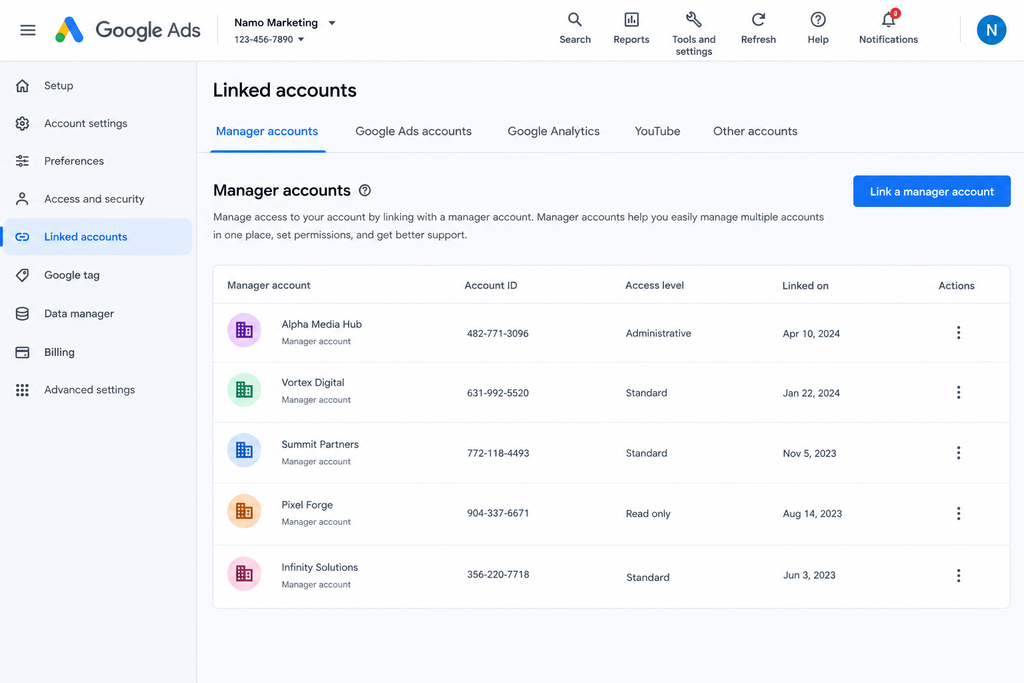
To transfer a Google Ads account from an agency, you do not move the account — you change who can access it. Sign in as an administrator, remove the agency’s manager account under Admin, then invite your new agency’s manager account. Campaign history, conversion data and learning stay intact because the account itself never changes.
That is the good news, and it covers most situations. The rest of this article deals with the cases where it is not that simple, and those are worth reading before you send the email that ends the relationship.
First, work out which situation you are in
Everything depends on one question: whose Google account created the Ads account, and whose payment method is attached to it?
| Situation | What you control | Difficulty |
|---|---|---|
| You created the account, agency has manager access | Everything | Easy |
| Agency created it, you are an admin on it | Everything | Easy |
| Agency created it, you have standard or read-only access | Limited | Moderate |
| Agency created it under their own billing | Almost nothing | Hard |
| Agency runs you inside their own account as a campaign | Nothing | Very hard |
Sign in to your Google Ads account and look at the top right. If you see a ten-digit customer ID that belongs to you, and your own payment details under Billing, you are in one of the first two rows and this will take twenty minutes.
If you cannot sign in at all, or you only ever see reports your agency sends, you are in the last two rows. Skip ahead to the section on what to do when you have no access.
The last row is the one to be alert to. Some agencies run every client as a set of campaigns inside one large account they own. There is no separate account to hand over. Your history is genuinely not portable, and no amount of pressure changes that, because the data belongs to an account that was never yours. You can export reports, but the account structure, the audience lists and the algorithmic learning stay behind.
The transfer, step by step
Assuming you have administrator access, this is the full sequence.
- Confirm your access level. Open Google Ads, go to Admin, then Access and security. Find your own email. It should say Admin. If it says anything else, ask the agency to upgrade you before you tell them you are leaving.
- Check your billing setup. Under Billing, then Settings, look at the payment method and the payments profile name. If it is your company and your card or bank account, you are safe. If it is the agency’s, see the billing section below.
- Export your data first. Before changing anything, download the last 24 months of campaign, keyword and conversion reports. This is insurance, not necessity, and it takes ten minutes.
- Invite the new agency. Ask them for their manager account ID, a ten-digit number. In Admin, then Account access, send the invitation to that manager account. They accept from their side.
- Confirm the new link is live. The new agency should be able to see the account before you remove anyone.
- Remove the old agency’s manager link. In the same screen, find their manager account and unlink it. This is instant and reversible only by re-inviting them.
- Remove individual user access. Separately from the manager link, check Access and security for individual agency staff emails and remove each one. People forget this step and former employees keep access for years.
- Change the password and check recovery options. If the account sits on a shared Google login, change the password and remove any recovery phone number or email belonging to the agency.
Pro tip: do steps 4 and 5 before step 6. If you unlink the old agency first and the new link has not gone through, you can end up locked out of an account spending money every hour.
The billing trap
This is where real loss happens in India, and almost nobody writes about it.
If the agency set up the account on their own payments profile, the billing relationship is between Google and the agency, not Google and you. You cannot simply swap the card. Google’s billing structure ties the payments profile to the account in a way that is not freely editable after the fact.
The practical consequence: you may need a new account, which means losing the history after all.
Before you accept that, check two things. Look under Billing, then Settings, for whose name and GSTIN appear on the invoices. Then look at whether the account is on monthly invoicing or automatic payments — the options for changing the payer differ between the two, and Google’s own billing documentation is the right reference for your specific setup rather than a blog.
There is also a tax angle. If your agency has been paying Google and rebilling you, your input tax credit position is different from what it would be if Google billed you directly. Worth raising with your CA during a transfer rather than after.
What to do when you have no access
If you cannot sign in at all, you are negotiating rather than clicking.
Ask in writing, specifically. Vague requests get vague answers. Ask for administrator access to the Google Ads account, naming the ten-digit customer ID if you know it, sent to a named email address, by a specific date.
Check what your contract says. Many Indian agency agreements are silent on asset ownership, which is bad for you but not fatal. Some explicitly assign accounts to the client. Read it before you escalate.
Point out what they lose. An agency refusing access on an account you fund is risking a public review and a payment dispute over a relationship that is ending anyway. Most reconsider.
Escalate if they still refuse. Google’s support can help in some ownership disputes but will not simply hand over an account on request.
Five mistakes that cost people their data
- Telling the agency you are leaving before securing admin access. Do it in the other order. Always.
- Removing the old agency before the new one is linked. You can lock yourself out of a live, spending account.
- Forgetting individual user access. The manager link is not the only door.
- Not exporting conversion and audience data. Remarketing lists in particular are easy to lose and slow to rebuild.
- Letting campaigns run unmanaged during the gap. A week of nobody watching a live account is a week of wasted spend. Pause or hand over cleanly.
What happens to performance after a transfer
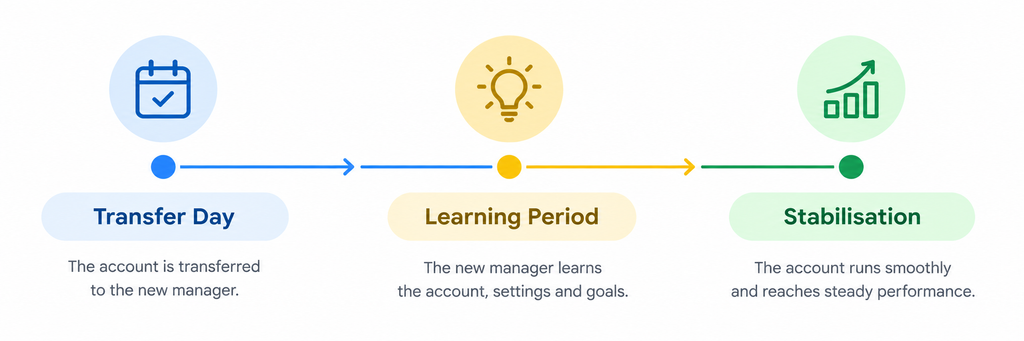
Expect a short dip. Not because the data is lost, but because the new team will restructure things, and every meaningful change resets some of the automated bidding learning.
A reasonable expectation is two to four weeks of unsettled performance before the account stabilises. Any agency promising immediate improvement on day one is telling you what you want to hear.
Ask your new agency to change one thing at a time for the first month, and to document what they changed and when. If performance moves, you want to know why.
Frequently asked questions
Can I transfer my Google Ads account to another agency?
Yes, in most cases. You are not moving the account — you are unlinking one manager account and linking another. Campaign history and conversion data stay with the account. The exception is when your agency runs your campaigns inside an account they own.
Does my agency own my Google Ads account?
Not usually, if the account was created for your business with your billing details. Ownership follows the account and its payments profile, not who does the work. Check whose name and GSTIN appear on the invoices under Billing settings.
Will I lose my conversion history if I switch agencies?
No, provided you keep the same account. Conversion history, audience lists and campaign data belong to the account, not the agency. You lose history only if you have to create a new account, which happens when billing or ownership cannot be separated from the agency.
How do I remove agency access from Google Ads?
Go to Admin, then Access and security. Remove the agency’s manager account link, then remove any individual agency staff emails listed as users. Do both — removing the manager link alone can leave individual users with access.
Can an agency refuse to give me access to my own account?
They can refuse, and some do, usually over an unpaid invoice. Whether they are entitled to depends on your contract. Settling the invoice and asking again in writing resolves most cases faster than escalation.
How long does a Google Ads account transfer take?
The technical steps take under an hour. Inviting and accepting a manager account link is usually instant. Allow two to four weeks for performance to settle once the new team starts making changes.
Before you send that email
Secure administrator access first, export your data second, line up the new agency third. Tell the current agency last. Done in that order, transferring a Google Ads account from your agency is an afternoon of admin rather than a loss.
If you want a second opinion on what you actually control before you make the move, Namo Marketing will look at your account structure and tell you where you stand. We run client campaigns in accounts the client owns, with invoices in the client’s name — so this conversation is one we have from the other side regularly.
1 thought on “How to Transfer a Google Ads Account From Your Agency”